A Concise Configuration Guide
BACnet MS/TP Configuration is the foundation of connecting legacy building devices to modern smart systems. For facility managers and IoT engineers, a reliable gateway setup ensures stable data flow between RS-485-based BACnet MS/TP devices and building management or cloud platforms. The Bivocom TG452 industrial gateway stands out as a robust solution for this task. It delivers native BACnet MS/TP support and simplifies integration with BACnet/IP, Modbus, and IoT cloud services.
Prerequisites You Need
- Bivocom Device: Like TG452 with BACnet‑enabled firmware (v52.1.0.17‑3578‑v1.0 or later)
- Basic Hardware: 1x USB-to-RS-485 converter, 1x RS-485 cable, 1x computer
- Software (for simulation/testing): BACnet‑stack, VTS, Yabe, VSPEmulator, Mbslave, MQTTX
If you use real BACnet MS/TP or IP devices, you can skip device simulation steps and go straight to gateway configuration.
Note: BACnet MS/TP is not a standard feature on all Bivocom gateways. If your device does not have the required firmware, contact Bivocom support.
Key Configuration Steps (Overview)
BACnet MS/TP remains the most cost‑effective field‑bus for HVAC, lighting, and access control. However, its configuration requires careful attention to MAC addresses, baud rates, and token‑passing parameters. A single mismatch can bring down your entire segment. This guide focuses on the critical decisions you must make. We will not repeat every UI screenshot from the full configuration document. Instead, we highlight the steps that matter most. For the complete walkthrough, watch our YouTube tutorial or contact us to request the full PDF document.
1. Enable Data Collection
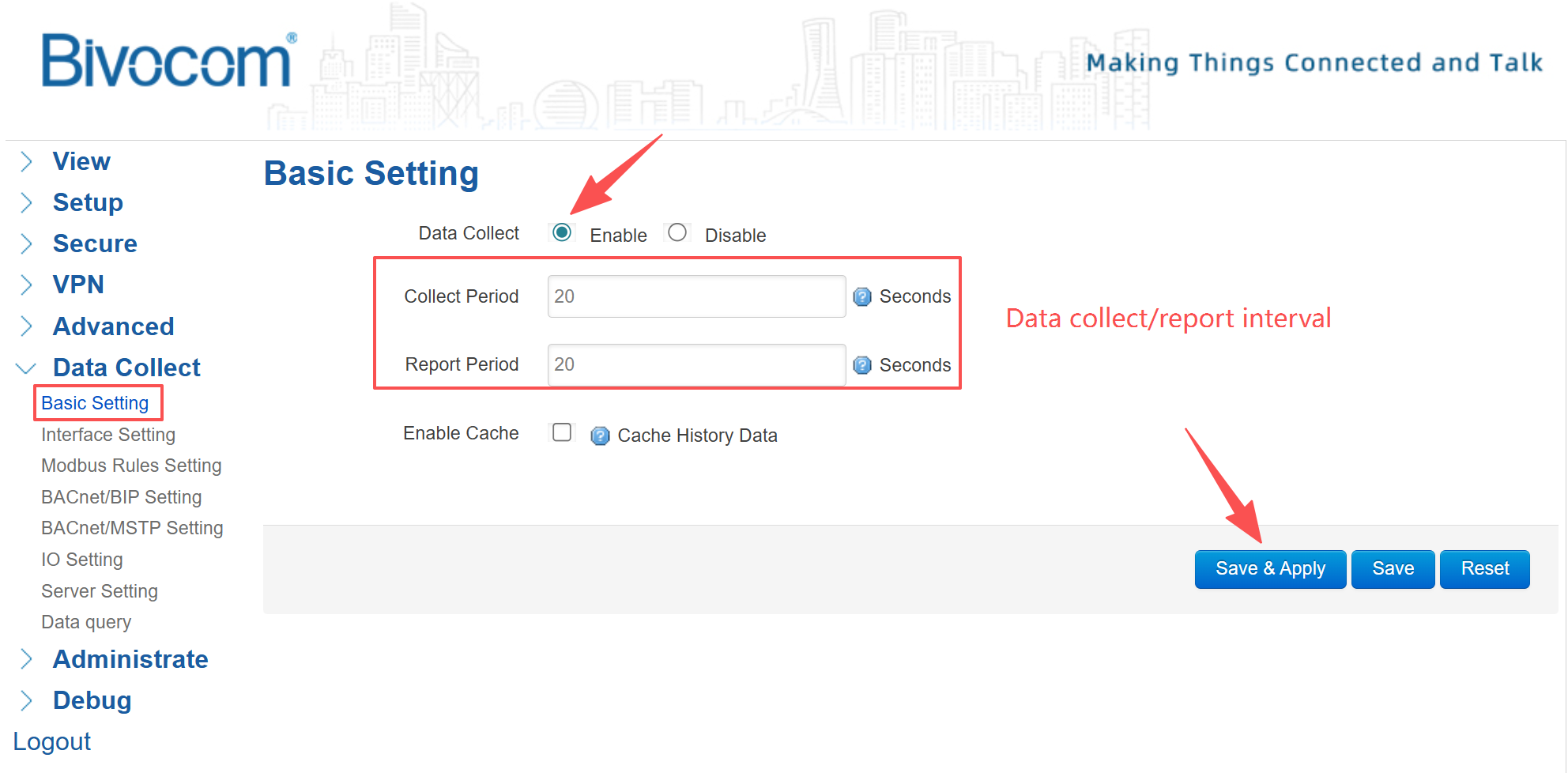
Log into the gateway WebUI (default admin/admin). Go to Data Collect → Basic Setting. Enable the “Data Collect” feature. Set collection and report intervals according to your application. Click Save & Apply.
2. Configure RS485 Interface
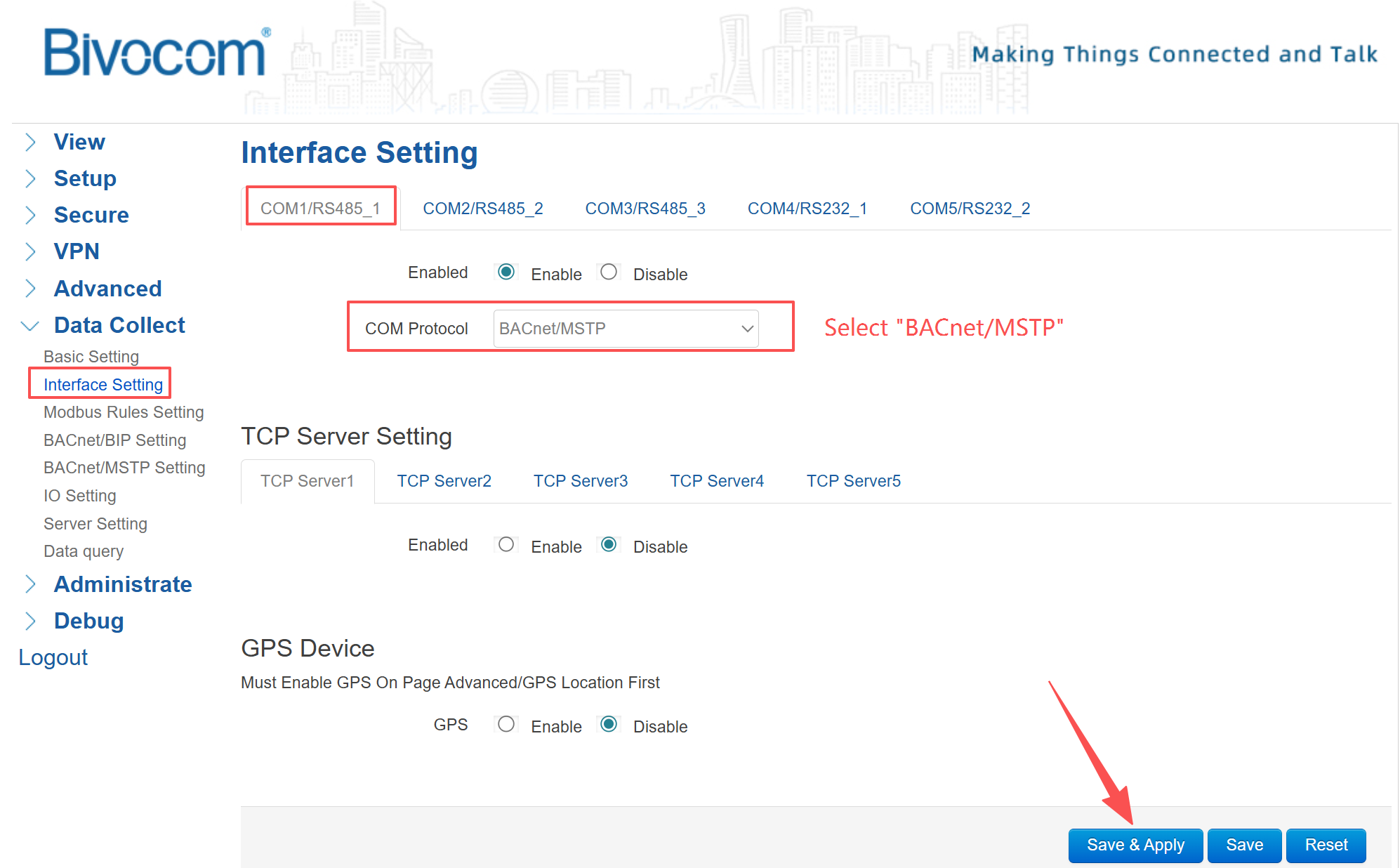
Navigate to Data Collect → Interface Setting. Enable the COM port you plan to use (e.g., COM1/RS485_1), and select the COM Protocol as “BACnet/MSTP”. Then click Save & Apply to apply the configuration. This binds the serial port to BACnet MS/TP communication.
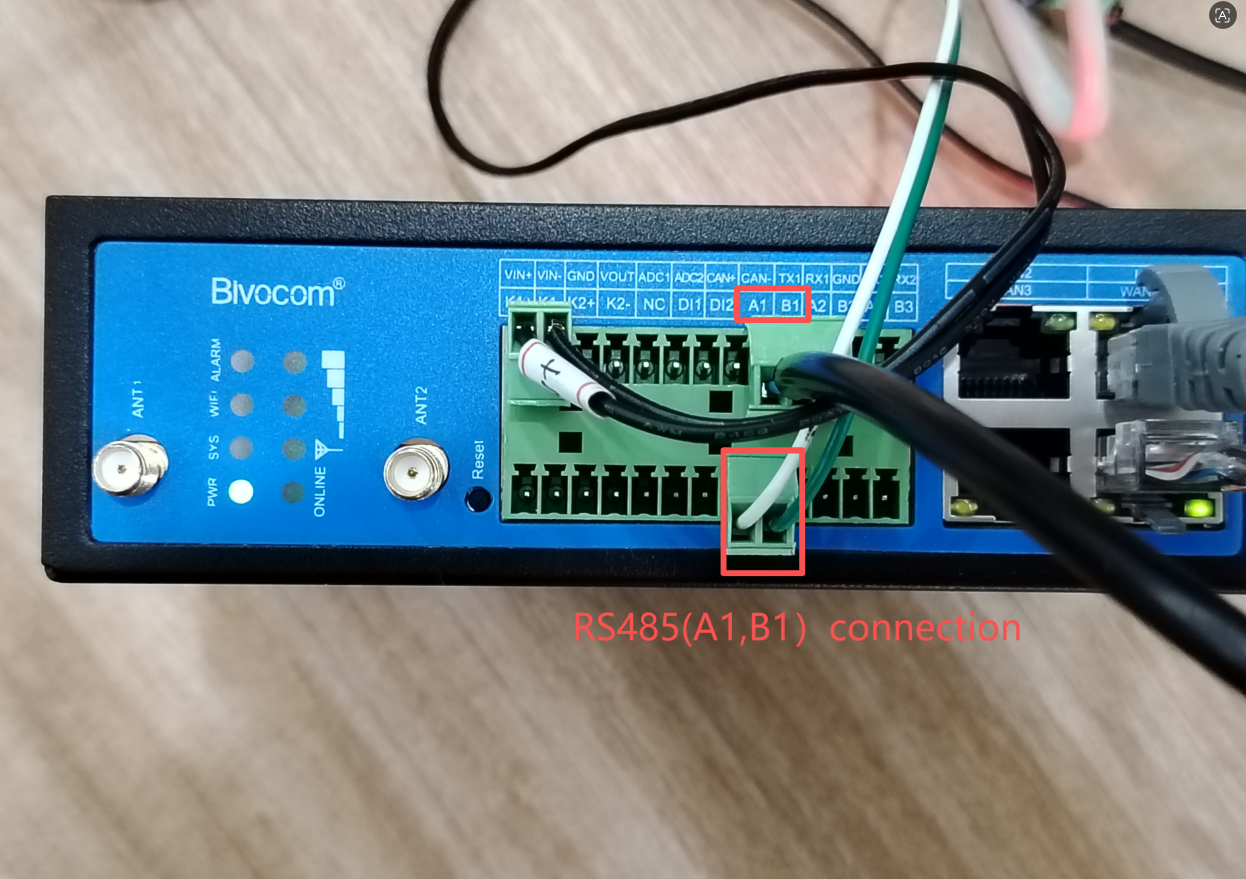
In this case, I’m going to use COM1/RS485_1(A1, B1) to connect with my PC through an USB to Serial convertor.
3. Set Up BACnet MS/TP Service
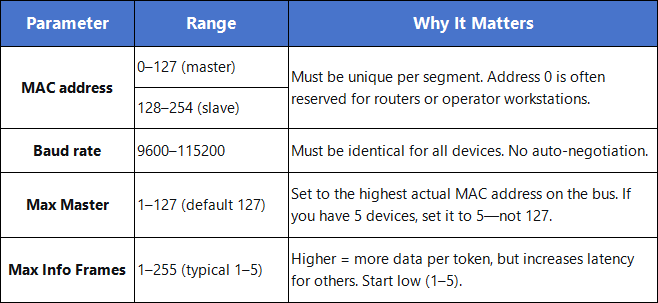
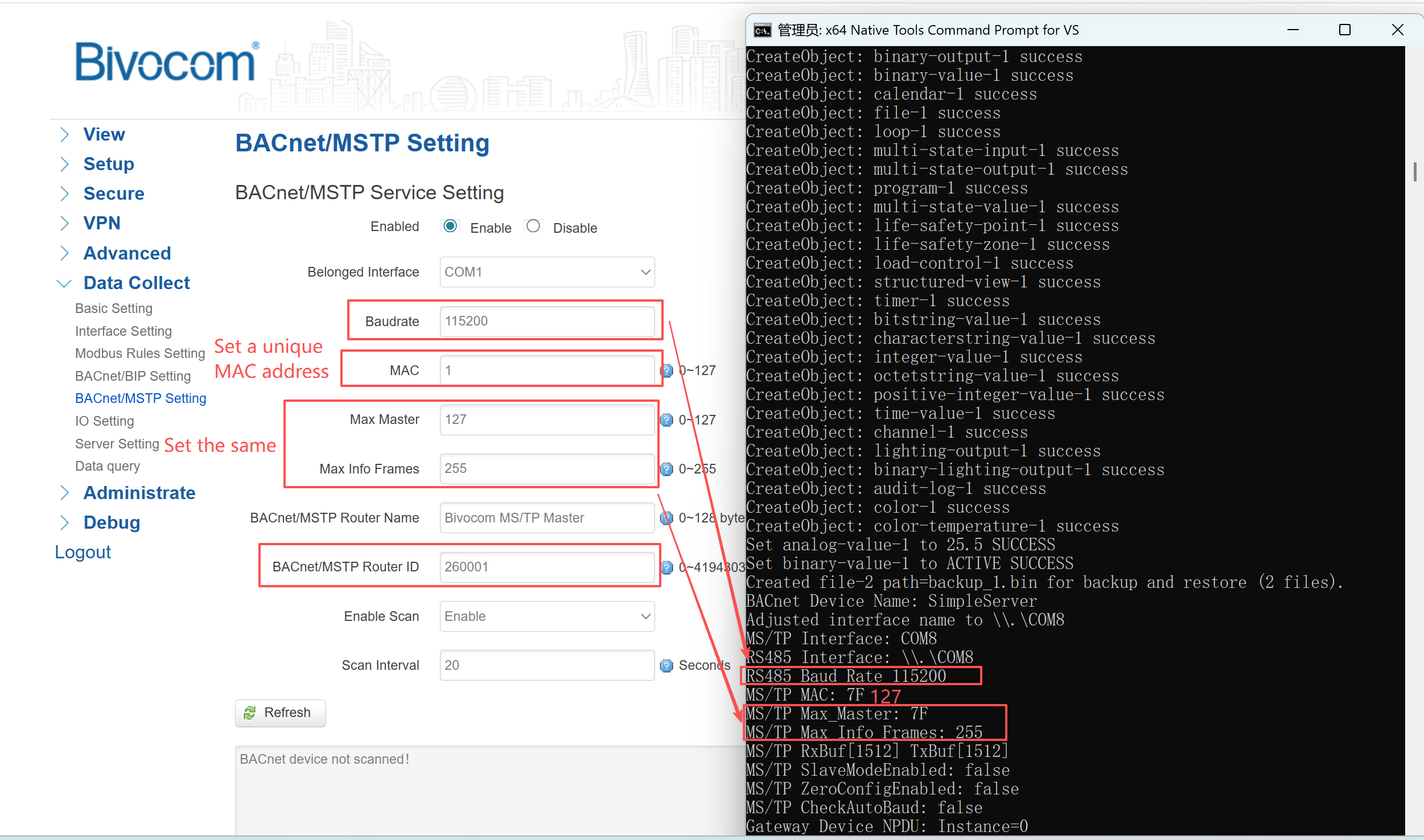
Go to Data Collect → BACnet/MSTP Setting. Enable the service and select the same COM port. Now configure these parameters to match your field devices:
Turn on Scan and set a scan interval (e.g., 20 seconds). This allows the gateway to automatically discover MS/TP devices on the bus. Click Save & Apply.
NOTE: In real application. it’s recommended to set the “Max Master” number according to your actual MS/TP device. The correct Max Master can reduce token rotation overhead and improves network efficiency. The default number is “127”. For example, if you have 5 MS/TP devices, you can configure the “Max Master” as “5” to match the actual device quantity.
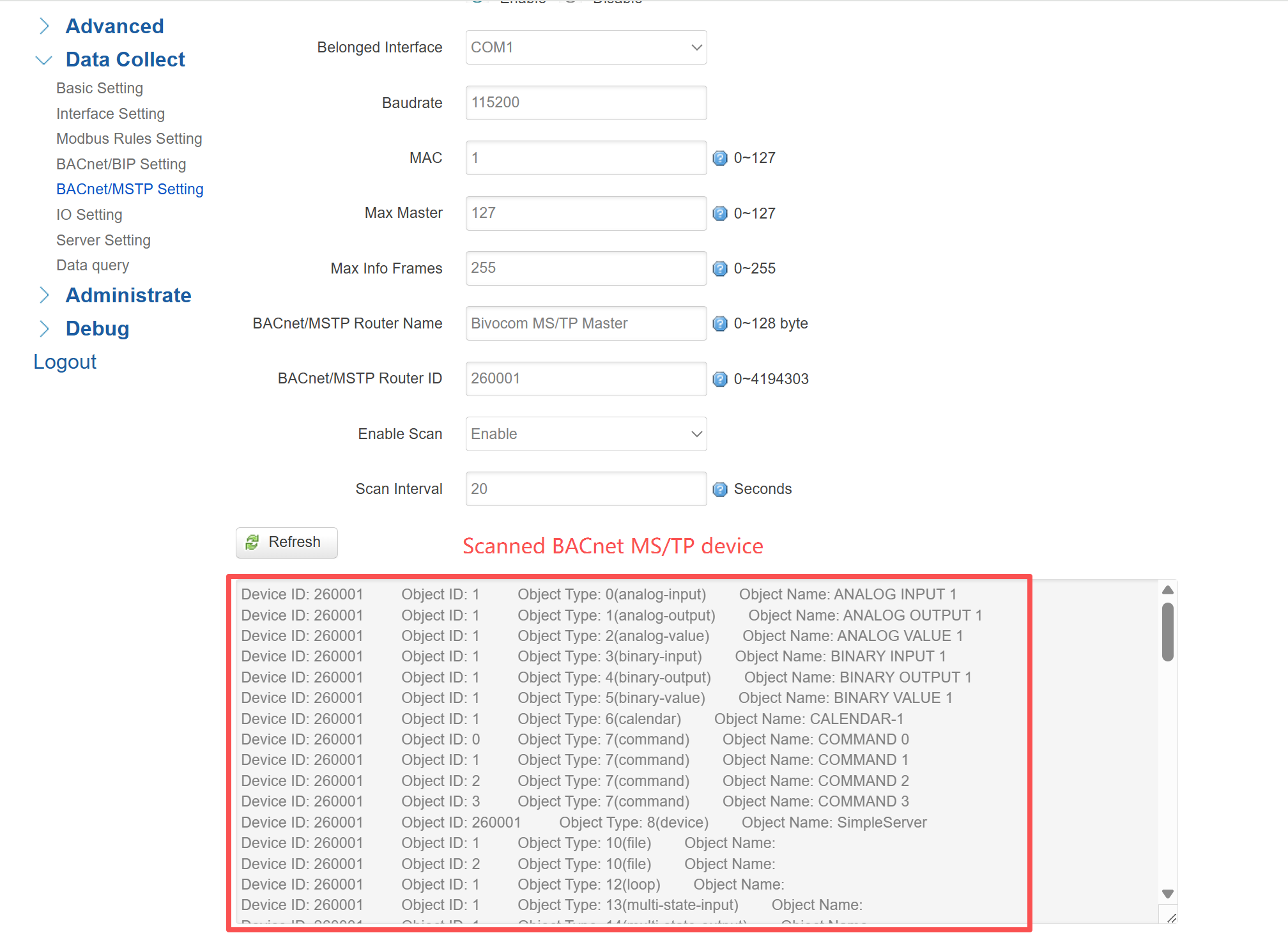
After saving, click the Refresh button. The gateway will list all discovered devices on the bus. This confirms that your physical wiring and baud rate settings are correct. If the list is empty, check your cabling and parameter matching.
4. Add Collection Rules
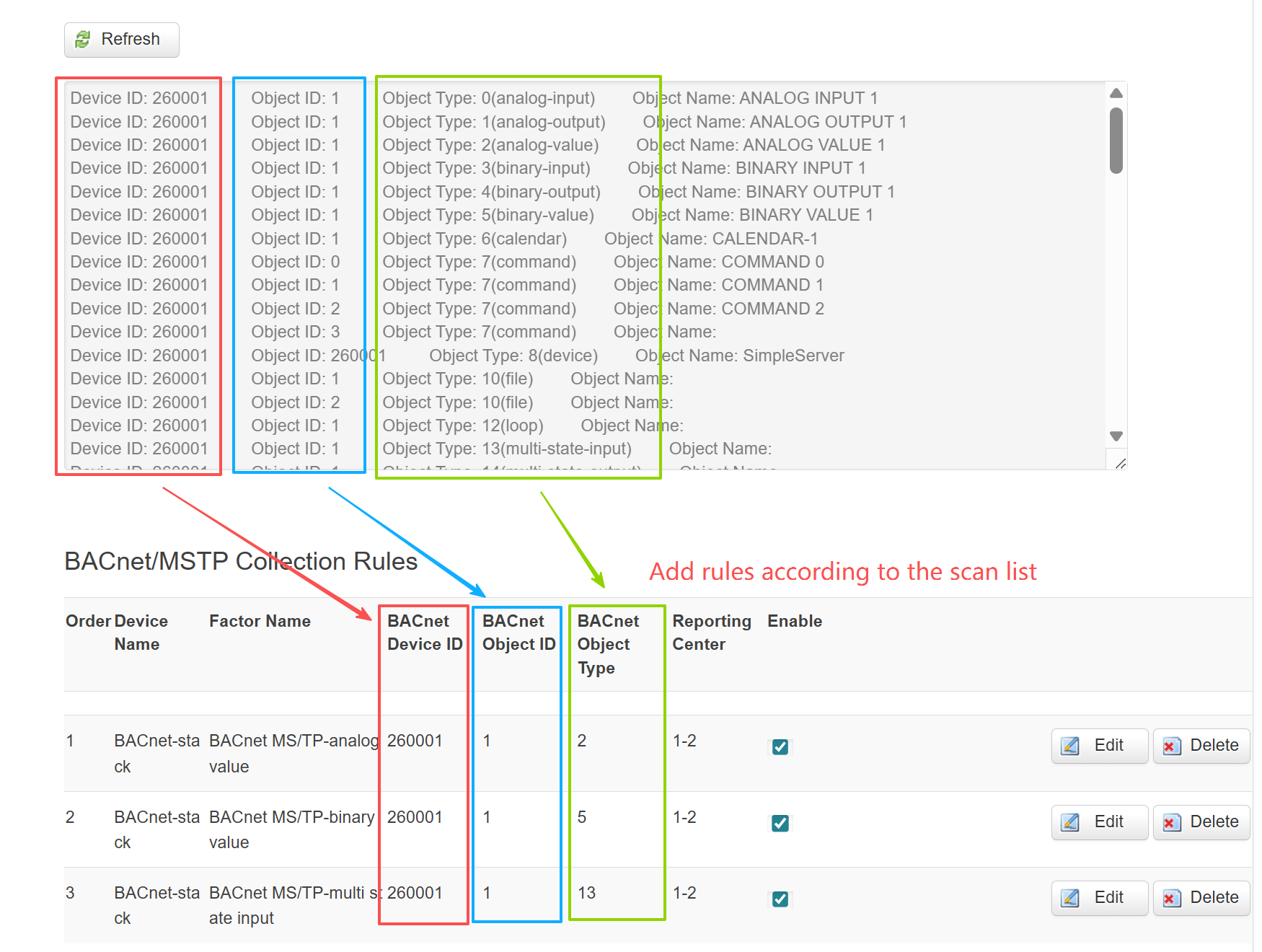
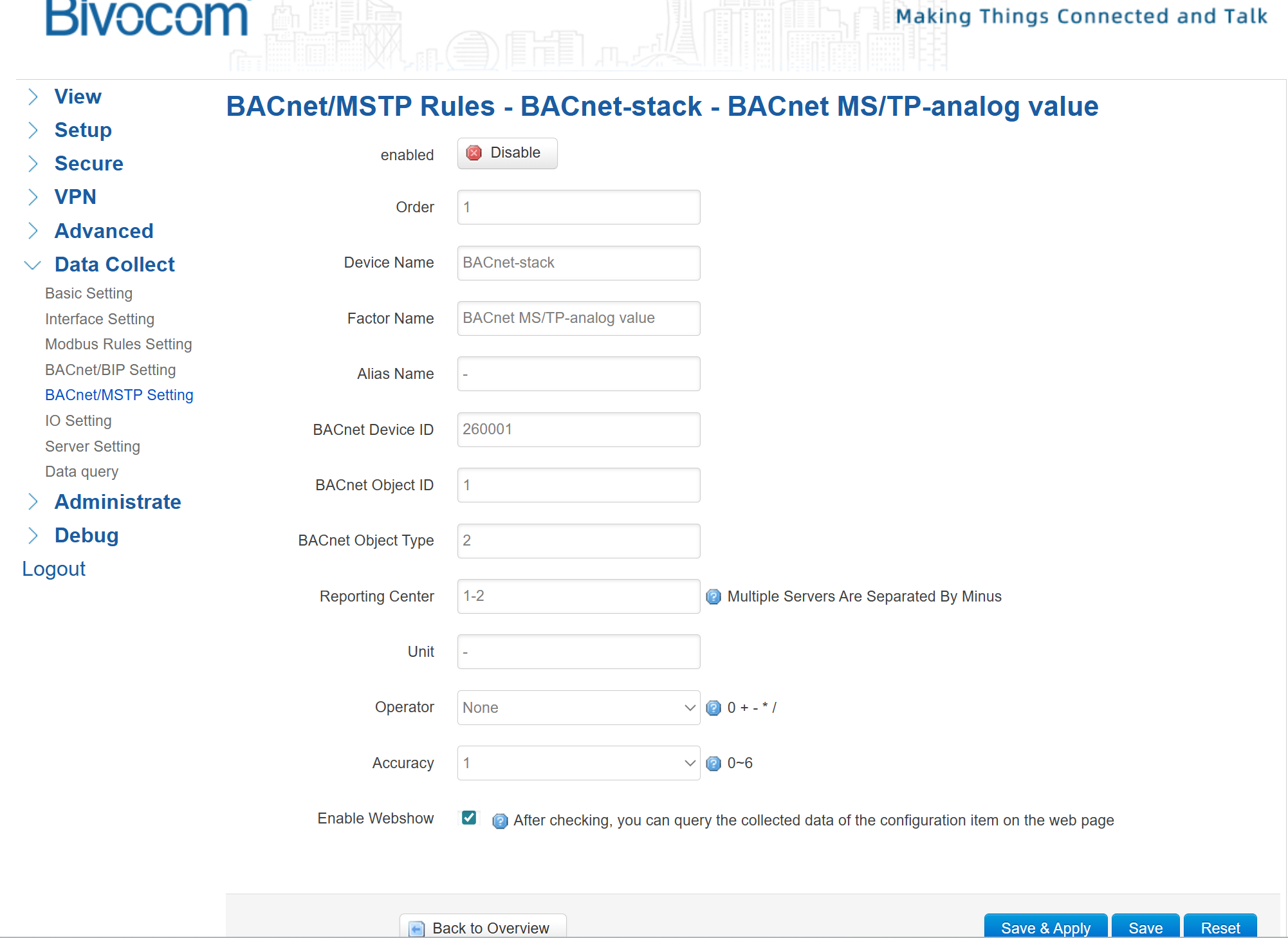
For each data point you want to collect, click Add under “BACnet/MSTP Collection Rules”. Match the Object ID and Object Type exactly as shown in the scan results. Optionally set a unit and accuracy for better reporting clarity. Repeat for each object. Click Save & Apply.
Supported object types: The gateway supports analog (input/output/value), binary (input/output/value), and multi‑state (input/output/value). If you need other object types, contact Bivocom support for evaluation.
5. Verify Data Collection
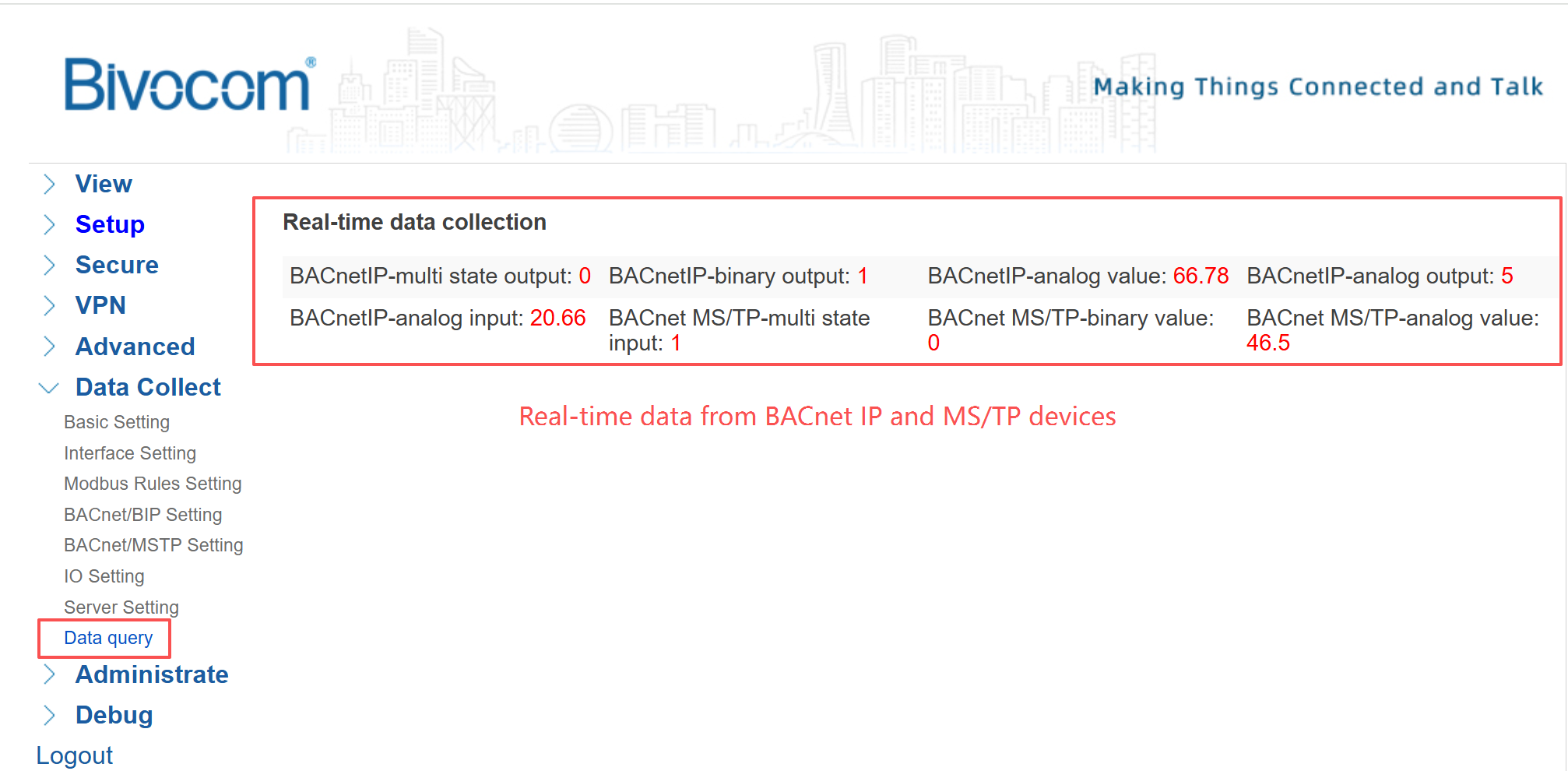
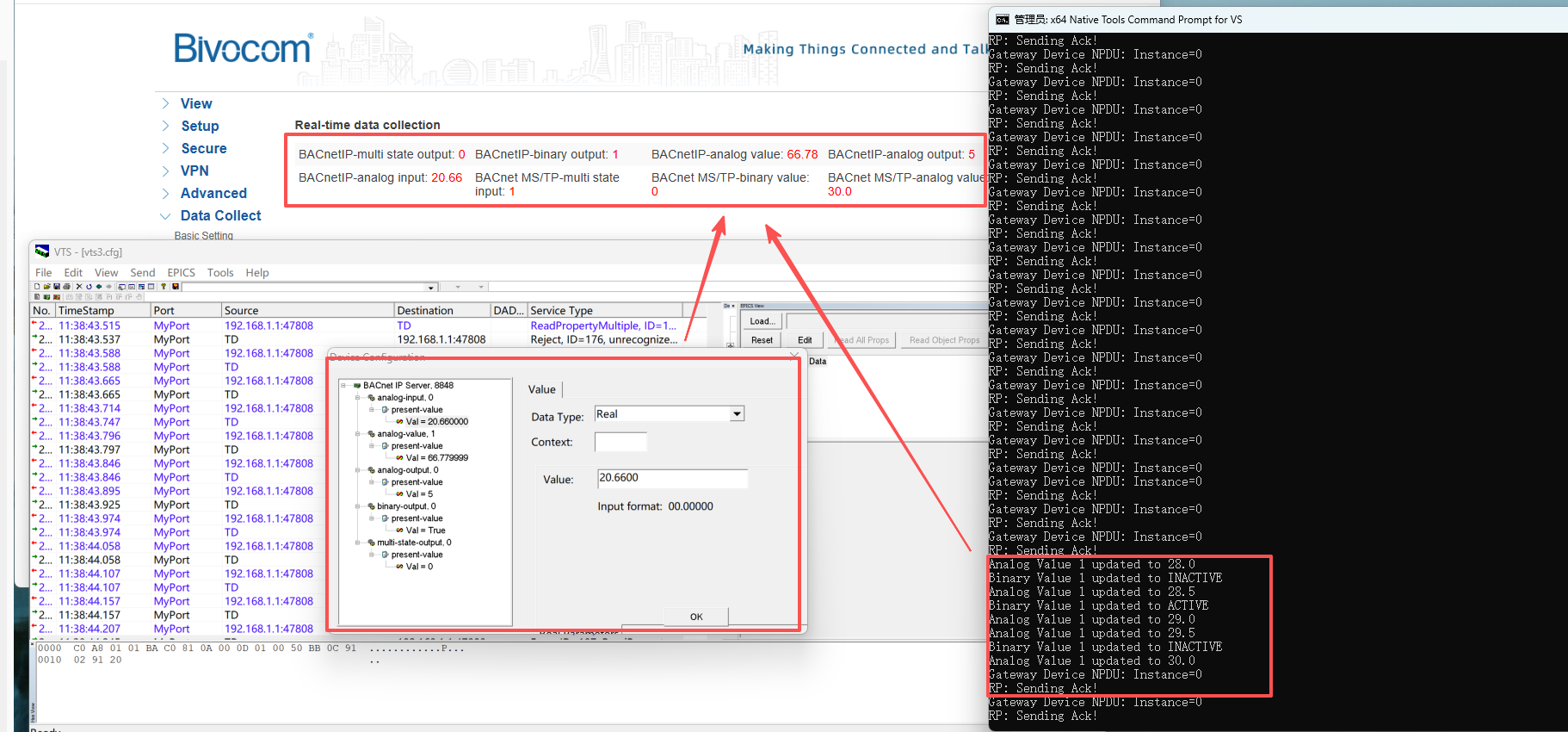
Go to Data Collect → Data Query. You should see real‑time values from your MS/TP devices.
Extended Functions After Configuration
Once BACnet MS/TP configuration is done, the TG452 unlocks three valuable functions:
Modbus to BACnet Conversion
Convert Modbus RTU/TCP data to BACnet objects seamlessly. The gateway handles all translation internally—no extra hardware needed. Simply configure the Modbus interface and rules, and the gateway automatically exposes Modbus registers as BACnet objects. Ideal for retrofitting legacy sensors.
BACnet Data Monitoring
Use YABE (Yet Another BACnet Explorer) to view and manage BACnet data via the gateway’s BACnet server mode. This allows you to verify data collection, browse object values, and debug network issues without additional software.
Cloud Data Transmission
Push BACnet data to cloud platforms or on‑premise data centers through MQTT, HTTP, or TCP/UDP. Configure server settings in the WebUI, and the gateway will report data in real time. This enables remote monitoring and integration with existing cloud infrastructure.
Related Resources
To deepen your understanding of BACnet deployment, explore our official resources:
- Blog: BACnet MS/TP vs BACnet/IP — Compare the two core BACnet protocols and hybrid system design.
- Blog: BACnet IoT Gateway for Smart Building Automation — Learn how BACnet + IoT powers modern smart buildings.
- YouTube Tutorial Video: How to Collect Data via BACnet — Basic BACnet data collection workflow with Bivocom gateways.
- YouTube Tutorial Video: How to Use Bivocom Industrial Gateway for BACnet Data Collection — Practical BACnet setup, monitoring, and cloud upload for industrial use cases.
Next Steps
Configuring BACnet MS/TP on a Bivocom gateway takes minutes—not hours. The result is a robust, deterministic communication link between your field devices and building management systems, without complex cabling or expensive infrastructure upgrades. Whether you are retrofitting a single HVAC unit or deploying a network of sensors across an entire campus, the TG452 delivers the reliable data acquisition your building automation projects demand.
- Add more field devices: Connect additional MS/TP devices on the same RS‑485 bus by assigning unique MAC addresses.
- Bridge to BACnet/IP: Use the gateway’s built‑in router function to connect MS/TP networks to IP backbones.
- Enable cloud integration: Push data to any cloud platform via MQTT, HTTP, or TCP/UDP.
- Convert Modbus devices: Bring legacy Modbus sensors into your BACnet ecosystem without extra hardware.
-on-Bivocom-TG465-IoT-Edge-AI-Gateway-with-Ubuntu-768x512.png "Install Ollama & Llama (LLM, large language model)) on Bivocom TG465 IoT Edge AI Gateway with Ubuntu")



Comment