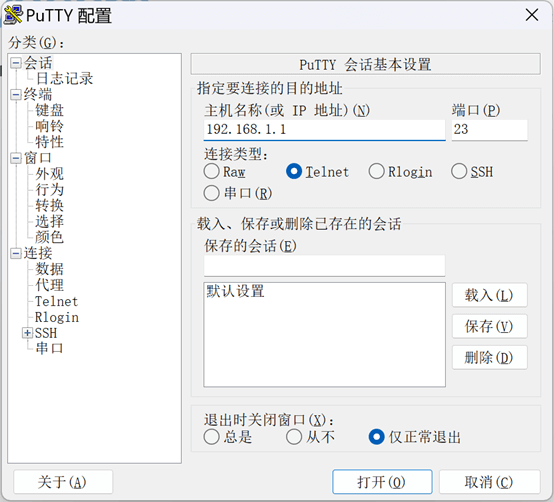
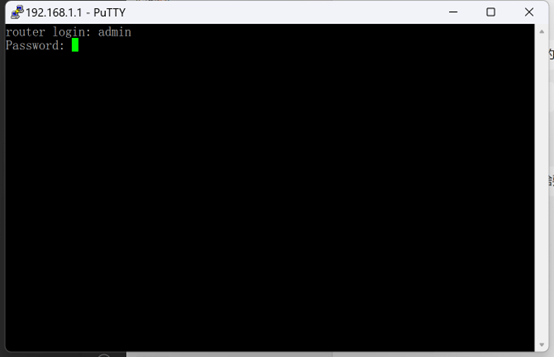
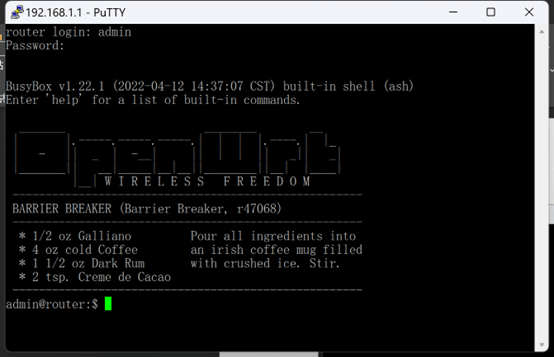
How to use Putty to login Bivocom router? May 9, 2023 Blog By Bivocom 2 comments Facebook Twitter Email Linkedin Open Putty, chose connection type as Telnet, port 23. (Bivocom router) Enter username and password, both are admin. Now you are able to send commands here. IoTputtyrouter Print Email IoT-enabled EMS Helps Hotels to Increase Energy Efficiency and Improve Guest Experiences IoT-based Intelligent Power Inspection Robot 2 Comments Anna May 11, 2023 at 6:21 pm Interesting post, thanks for sharing. Bivocom May 29, 2023 at 3:02 pm Happy to help you! And we also have step-by-step instructions video on Youtube and Linkedin, hope that can help you. Leave a Reply Cancel reply Save my name, email, and website in this browser for the next time I comment. Δ Related Posts [Case Study] Solar Smart DMA August 20, 2026 Smart DMA IoT August 14, 2026 [Case Study] African Cotton Ginnery August 7, 2026 IoT Gateway vs RTU vs Modem vs Router July 31, 2026




2 Comments